Noctisai
A stealthy, secure, and advanced AI assistant for interviews & meetings.
A desktop application for private, secure AI conversations with zero-knowledge encryption, stealth display modes, and undetectable operation. Now available on Windows and Linux!
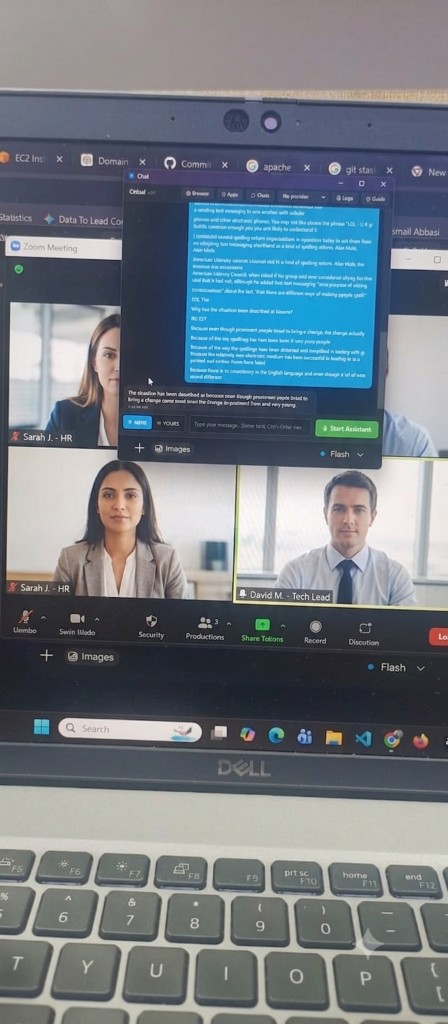
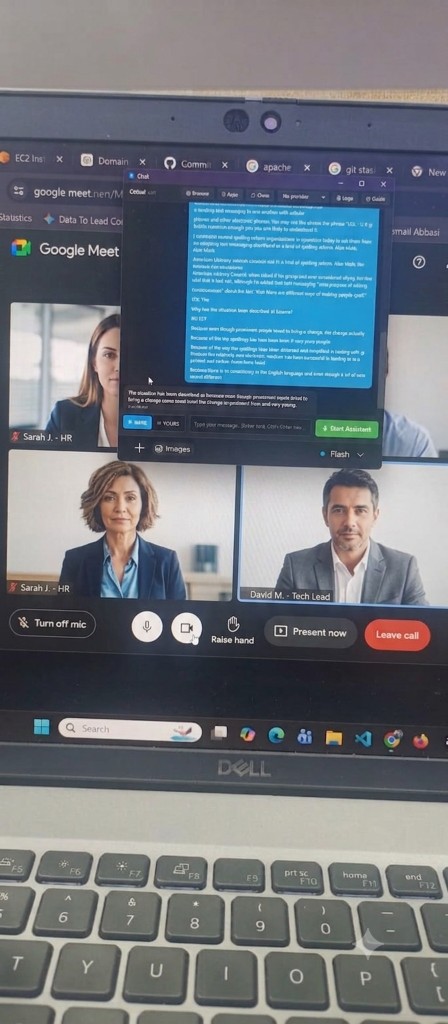
Seen in real interviews
Works beside Zoom & Google Meet
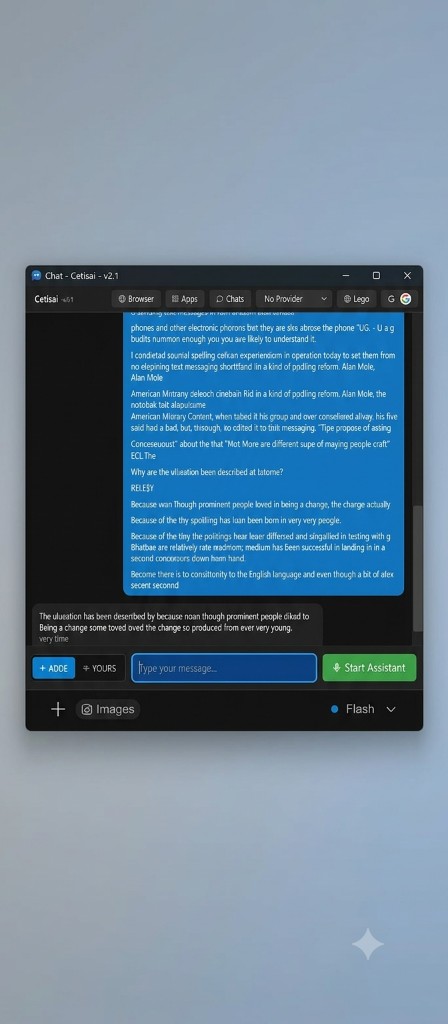
Keep Noctisai open during live interviews. Your AI overlay stays on your screen — hidden from screen share, taskbar, and recording tools.
Powerful Features
Everything you need for secure, private AI conversations
Privacy & Stealth
Undetectable presence hidden from taskbar and task manager. Global stealth shortcut (Ctrl+Alt+H) to hide instantly.
Deep Dive:
- Hidden from the taskbar, task manager (via process masking), and screen sharing tools like Zoom, Teams, and OBS.
- Use the Global Stealth Shortcut (Ctrl+Alt+H) to toggle visibility instantly without using your mouse.
- Includes a built-in Stealth Browser that opens all links in-app to prevent unexpected external browser windows popping up during critical moments.
- Automatically detects when screen sharing starts and hides sensitive UI elements to ensure your privacy is never compromised.
Ghost Typer (Humanizer)
Physically simulates human typing with variable speeds and 'fat finger' mistakes to bypass copy-paste detection.
Deep Dive:
- Copy your AI-generated text, click your target window, and press Ctrl+Alt+V to start.
- Physically simulates human keystrokes to paste answers into restrictive code editors (e.g., HackerRank, LeetCode) or monitored docs.
- Includes a variable typing speed algorithm to mimic natural thought processes and hesitations.
- Features a 'fat finger' algorithm that intentionally makes typos and backspaces to correct them, completely bypassing copy-paste detection.
Real-Time Voice Transcription
Capture your mic (Mine Mode) or system audio (Yours Mode) using Whisper for real-time AI context.
Deep Dive:
- Mine Mode: Accurately transcribe your own voice using your microphone for dictation or querying the AI.
- Yours Mode: Captures your system audio (from meetings, interviews, or videos) to give the AI real-time context of the conversation.
- Powered by the highly accurate Whisper transcription engine (configurable via OpenAI or Groq).
- Features Advanced Voice Activity Detection (VAD) to only process audio when someone is actually speaking, saving you API costs.
Transparent OCR Overlay
Extract text seamlessly using a transparent overlay window. Perfect for uncopiable screens (Ctrl+Alt+O).
Deep Dive:
- Press Ctrl+Alt+O to instantly activate a transparent, draggable overlay on your screen.
- Select any area to automatically extract text using Optical Character Recognition (OCR).
- Perfect for quickly extracting questions or code from uncopiable screens, locked PDFs, or secure browser environments.
- Extracted text is immediately sent to the AI as context without you needing to type a single word.
Multi-Model Support
Integrated with OpenAI (GPT-4/3.5), Groq (Llama 3, Mixtral), and OpenAI-compatible APIs like Ollama.
Deep Dive:
- Integrated directly with OpenAI for industry-leading reasoning (GPT-4o, GPT-3.5).
- Supports the ultra-fast Groq engine (Llama 3, Mixtral) for near-instantaneous responses during fast-paced interviews.
- Connects to any OpenAI-compatible local APIs (like Ollama) for completely offline, 100% private inference.
- Easily configure your API keys in Settings > AI Accounts and switch between models seamlessly mid-conversation.
Zero-Knowledge Encryption
All chats and API keys are encrypted locally using AES-256-GCM. We never see your data.
Deep Dive:
- All your chat logs, prompts, and API keys are encrypted at rest locally on your machine.
- Uses military-grade AES-256-GCM encryption with PBKDF2 key derivation from your Master Password.
- No cloud databases or remote telemetry. We use a strict zero-knowledge architecture.
- Even if your device is compromised, your data is mathematically unreadable without your Master Password.
Content Protection
Native OS-level protection prevents screenshots and screen recording of the app window. Auto-hides on screen sharing.
Deep Dive:
- Native OS-level protection actively blocks screenshots of the application window.
- Prevents screen recording software (OBS, ShareX) from capturing the UI.
- If you are sharing your screen (e.g., Zoom, Teams, Google Meet), Noctisai automatically detects the screen share state.
- The app will render as a black box or become completely invisible on the broadcasted screen, ensuring your privacy.
Advanced Window Management
Always-on-top, keyboard-controlled resizing and positioning, plus desktop app embedding capabilities.
Deep Dive:
- Toggle Always-On-Top so the AI assistant never gets buried beneath other windows.
- Resize the window incrementally using Ctrl+Alt+Plus/Minus without needing to drag edges with a mouse.
- Move the window precisely around your screen using your arrow keys for exact positioning.
- Unique capability to embed other Windows desktop applications directly within the Noctisai window for seamless integration.
Multiple Chat Contexts
Create separate chat sessions with custom context for different scenarios (interviews, meetings, coding, etc.).
Deep Dive:
- Create separate, isolated chat sessions tailored for specific use cases.
- Inject custom system instructions into each session to change the AI's behavior and constraints.
- Easily switch between profiles like an 'Interview Coach', 'Meeting Summarizer', or 'Coding Assistant'.
- Conversation histories remain isolated per context, preventing the AI from getting confused across different tasks.
How It Works
Get started in minutes with these simple steps
Download and Install
Get the latest binary installer (Windows .exe or Linux .AppImage/.deb). Run the installer, and the app will launch silently.
Setup Your Environment
Create a secure master password (minimum 12 chars). Configure your API keys (OpenAI, Groq, or compatible) in Settings.
Master Core Shortcuts
Ctrl+Alt+H to Show/Hide app. Ctrl+Alt+V to Ghost Type clipboard. Ctrl+Alt+O for OCR Selection Overlay.
Utilize Voice Modes
Use 'Mine Mode' to transcribe your microphone, or 'Yours Mode' to capture system audio for real-time interview context.
Deploy Ghost Typer
Copy AI-generated text, click your destination window, and press Ctrl+Alt+V to human-type the text past detection.
Download Releases
Get the latest application releases and start using our tool today.
Official Update v1.0.4 - Fix GitHub Actions and Auto VAD.
1.0.4
6/5/20261.0.3
6/5/20261.0.2
6/3/20261.0.0
3/30/2026System Requirements
- Operating System: Windows 10/11, Ubuntu 22.04+, Fedora, or Arch Linux
- Architecture: x64 (64-bit)
- Disk Space: 150MB+ free space
Important: This is a cross-platform desktop application, not a web app. After downloading, install it on your machine and run it natively. All your data is stored locally on your computer and is never sent to any central server, ensuring absolute privacy.
Privacy & Security First
Your privacy is not an afterthought—it's our foundation
Trust is earned, not assumed. We've built Noctisai with privacy and security as core principles, not features added later. Your conversations are yours alone.
Zero-Knowledge Encryption
All chats and API keys are encrypted at rest using AES-256-GCM with PBKDF2 key derivation. We use zero-knowledge architecture, meaning even we cannot access your data.
No Telemetry
We don't track you. No analytics, no usage data collection, no telemetry. Your privacy is respected from day one.
Local-Only Storage
All your data stays on your computer. Nothing is stored in the cloud. You have complete control over your information.
Screen Sharing Protection
Advanced OS-level process masking and content protection prevents screen capture tools (like Zoom, Teams, OBS) from recording your conversations.